Spring is Back! FormulaShare Spring '25 Release
MAJOR RELEASE

Another year flies by... birds are blooming and flowers singing, and it's time for our annual major release!
Diagrams of Identity Flows in Context
Each of the flow articles and identity pages now include versions of a diagram showing how each of the flows fit into the landscape of technologies used in SSO and OAuth 2.0.
These are based on a diagram from a set created by Jesse Lingo, showing how the flows can be grouped by technologies involved and the context in which they're used:
Spring is here! FormulaShare Spring '24 Release
MAJOR RELEASE
We've been hard at work adding FormulaShare features, improvements and fixes. We're really excited about the changes which offer more flexibility and help to move away from code altogether!
What do I need to know?
The Spring release includes new enhancements, but has no expected impact to your existing functionality. You'll be pleased to know no changes are needed unless you'd like to adopt some of the exciting new features.
Introducing FormulaShare Enterprise
FormulaShare is nearly five years old. From April 2023 the project is moving to the next level of maturity, with free and subscription-based options soon becoming available on the AppExchange.
I wanted to take a few moments to explain why...
- Read more about Introducing FormulaShare Enterprise
- Log in to post comments
Client Credentials Grant Flow
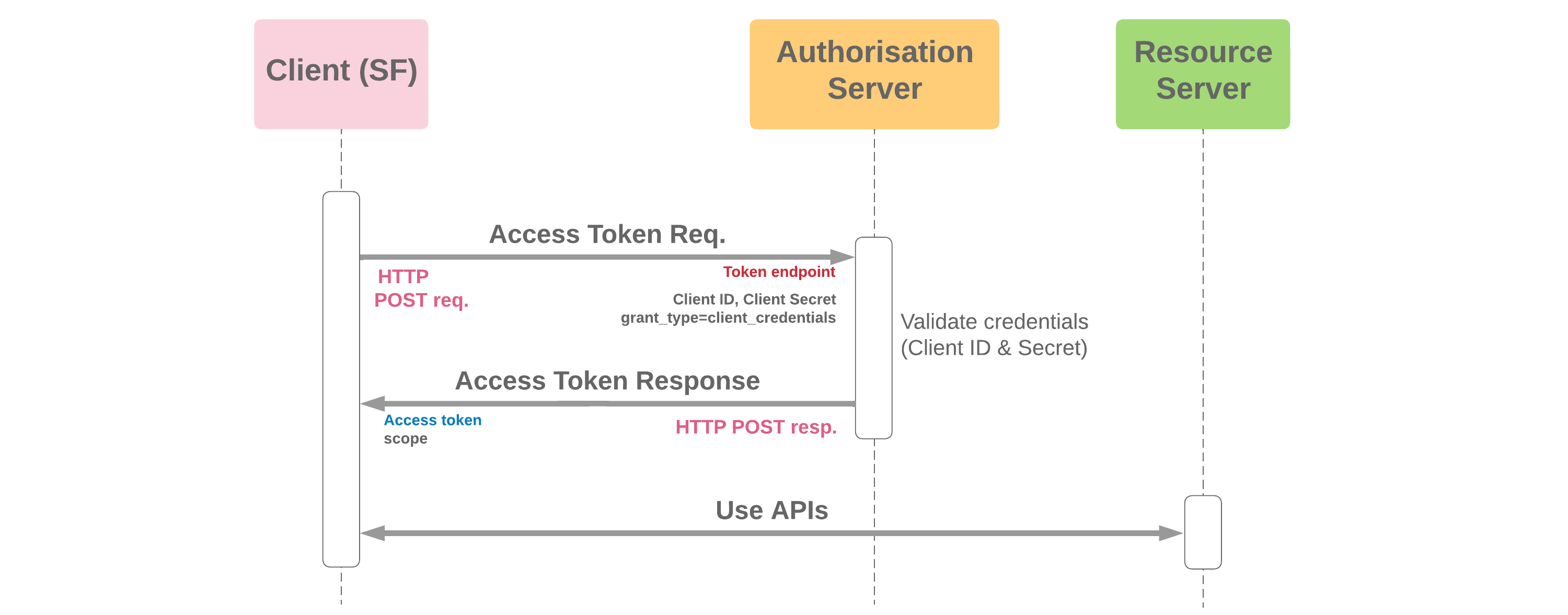
- The client credentials grant flow is used for server-to-server interaction, and allows clients to obtain an access token outside of the context of a user
- Since client authentication is used as the authorisation grant, no additional authorisation request is needed
- As with other server-server flows, a refresh token will not be supplied
- Salesforce can act as the client, and as of Winter '23, Salesforce also supports this flow while acting as the server. When Salesforce participates as the server, an execution user must be selected in the connected app which determines the running user and permissions for any integration activity
Mutual TLS
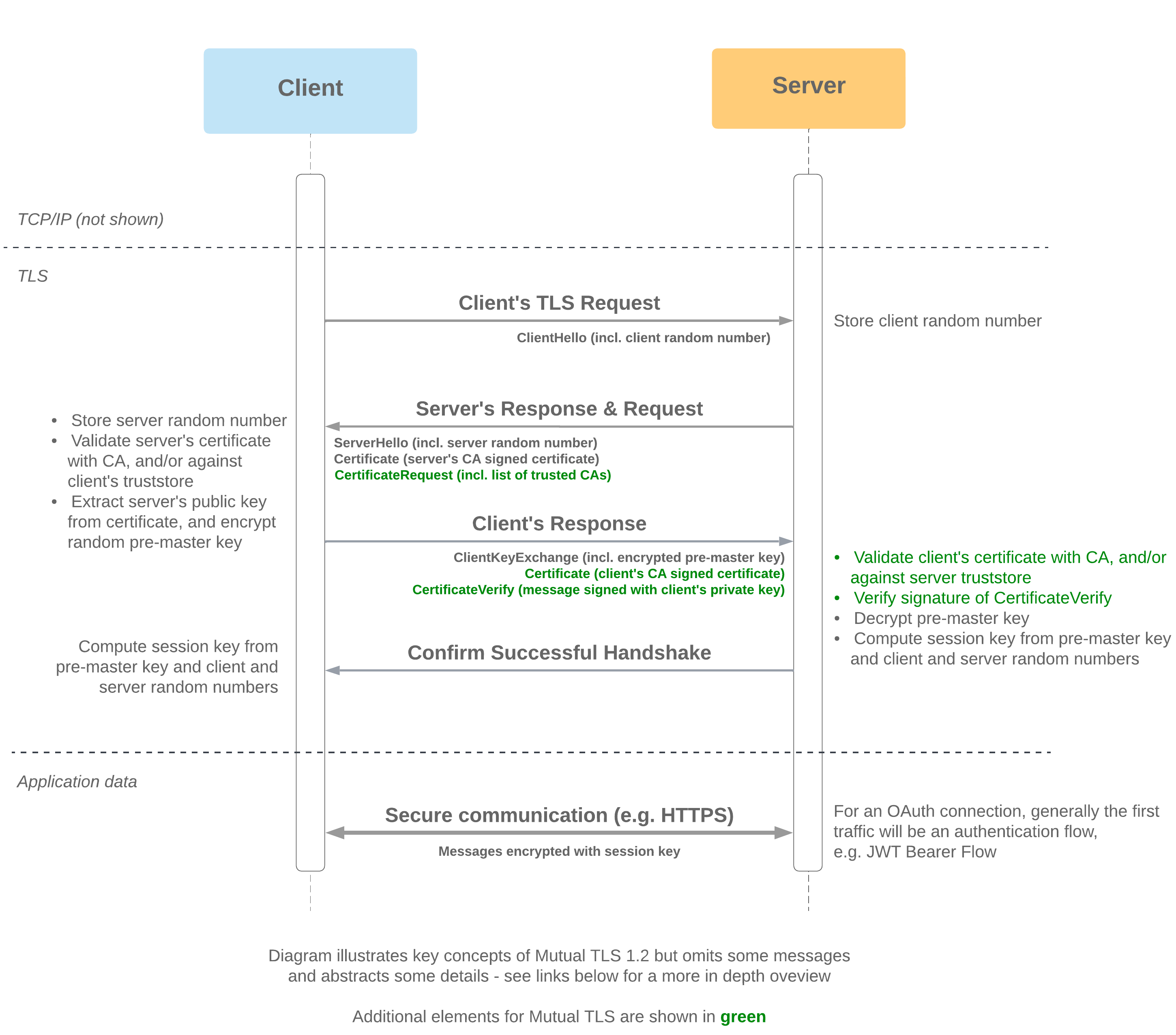
- Mutual TLS (MTLS) prevents security from being compromised by requiring the client to prove its identity to the server in addition to the server proving its identity to the client
- This mechanism provides a convenient way to ensure that the right server application can be accessed by the right set of client applications (SaaS applications share the same infrastructure, domain name, and IP ranges, so this protects against attacks leveraging alternative instances of public cloud applications)
- As MTLS (applied at the network layer) is often used in combination with OAuth authentication and authorisation flows (which take place in the application layer), this provides an additional layer of security
- Client identity is conferred by server verifying the signature of the CertificateVerify message (the transcript up to this point, signed with the client's private key)
- As with one-way TLS, server identity is conferred through its ability to generate a matching session key
When Salesforce acts as the Client (e.g. Apex callout)
- Salesforce will only trust a CA signed certificate from the server
- Salesforce can present either a CA signed or self-signed certificate. For Apex and Named Credentials callouts any certificate in the org can be specified. For outbound messages, SAML assertions, AJAX proxy and delegated authentication the certificate used will be the one set as the API Client Certificate in Certificates and Key Management
When Salesforce acts as the Server (e.g. Apex REST service)
- Salesforce will only accept a CA signed certificate from the client, and this certificate must be uploaded to the org's truststore - the repository of accepted MTLS certificates (see setup steps below)
- Salesforce will present its CA-signed certificate (this certificate is managed by Salesforce and independent of the customer's org)
- A client should connect to the My Domain login URL via port 8443
- To set up MTLS with Salesforce acting as the server:
- Raise a ticket with Salesforce
- Assign the "Enforce TLS/SSL Mutual Authentication" and "API Only User" permissions to the Integration User
- Upload the client's CA Signed certificate to the Mutual TLS section under Certificate and Key Management in Setup (the Salesforce org's truststore)
Standard (One-Way) TLS
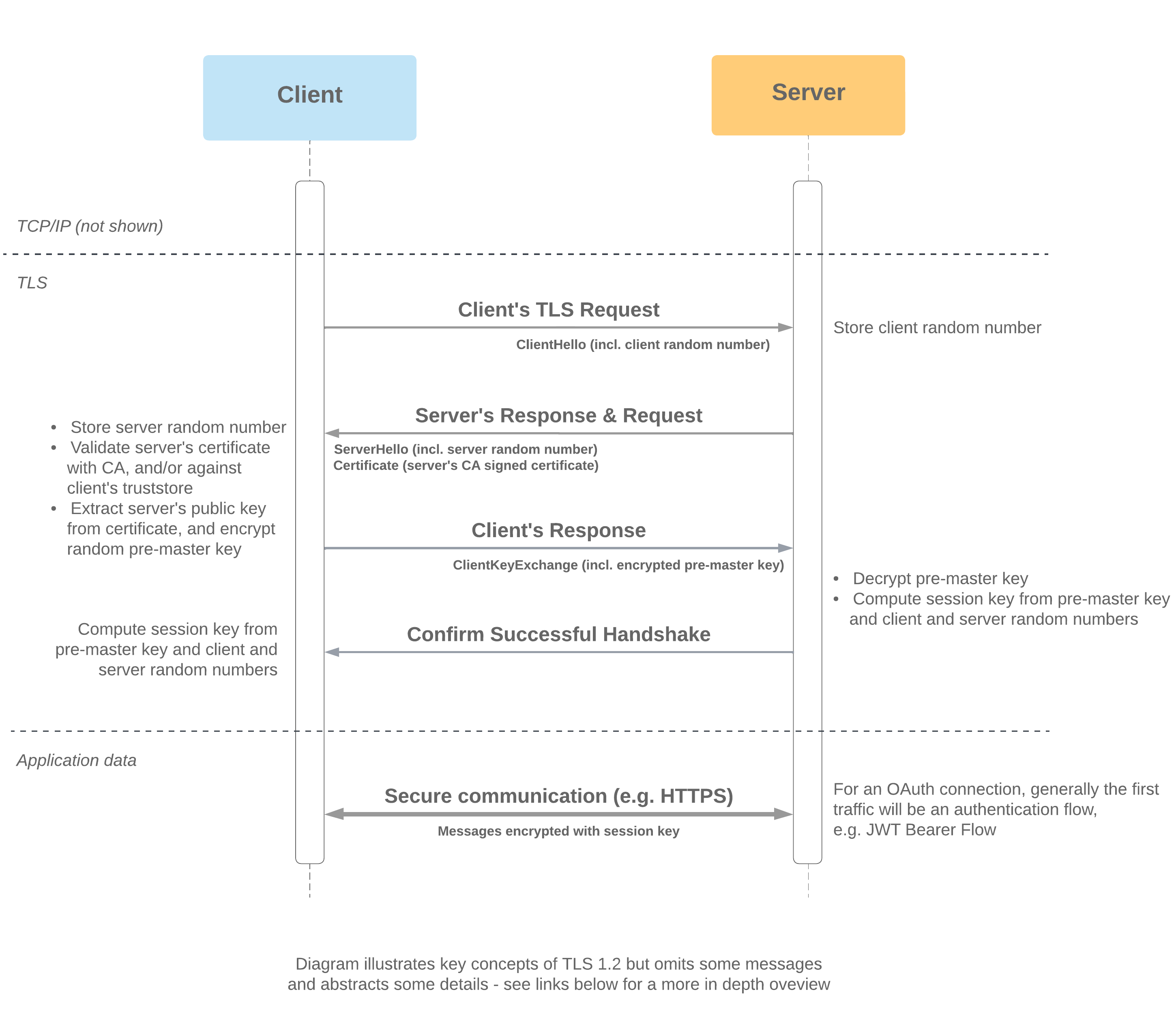
- TLS (Transport Layer Security) takes place at the network layer and precedes all HTTPS traffic, including user authentication
- The client may be a browser or a client application participating in server-server integration
- One-way TLS protects against impersonation of the server, as the server proves its identity to the client by demonstrating possession of its private key
- The goal is for the client and server to establish a secure connection by establishing cryptographic keys that will be used to protect data in transfer
- The shared session key required for HTTPS is generated from the pre-master key, client and server random numbers - both client and server require all of these to generate matching keys
- Server identity is conferred by its ability to decrypt the pre-master secret to generate a session key matching the one generated by the client
When Salesforce acts as the Client (e.g. Apex callout)
- Salesforce will only trust a CA signed certificate from the server
When Salesforce acts as the Server (e.g. Apex REST service)
- Salesforce will present its CA-signed certificate (this certificate is managed by Salesforce and independent of the customer's org)
- A client can connect to the My Domain login URL via port 443
Identity Flows Heroku App
Experimenting with your own org is the best way to really get to know these flows and understand how they're configured in practice.
The 3rd Age of Trigger Frameworks - Part 1
Looking for A Framework?
Trigger frameworks - not something we'd look to change too often. But let's say we're working on a brand new org, or looking for something to complement a change in strategy. Shall we copy-paste that framework which worked well for so long? Or find the one on Github with the most stars?
Let's first put cards on the table - traditional trigger frameworks don't play well with modern development practices in Salesforce.